


FetchKids - Organized Pickups
3.218.00 Reviews
App Specs
- Version
- 1.7.0.3
- Updated On
- License
- Free
- Downloads
- 10,000+
- Developer
- Expanded Apps, Inc.
- Categories
- Parenting
- Platform
- Android
Screenshots
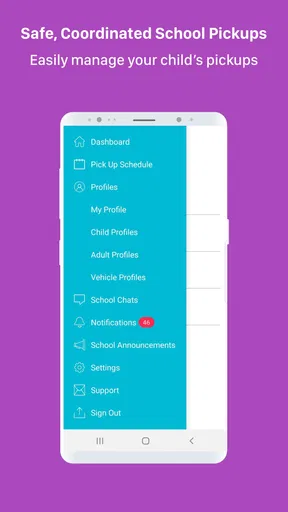
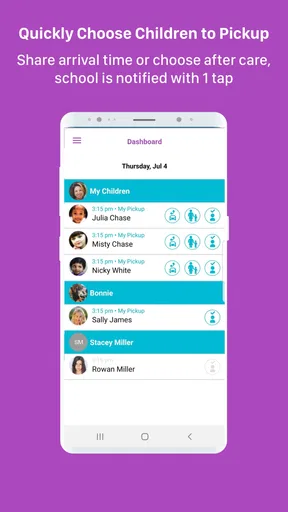
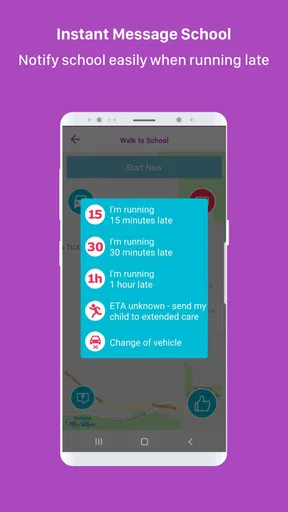
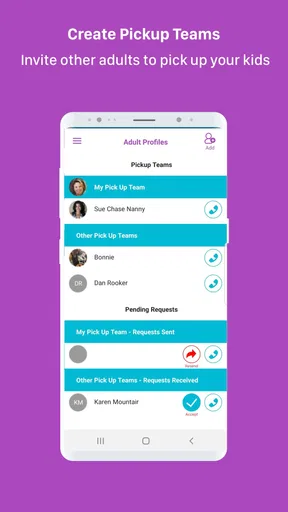
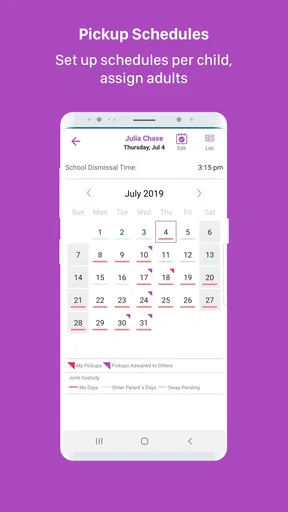
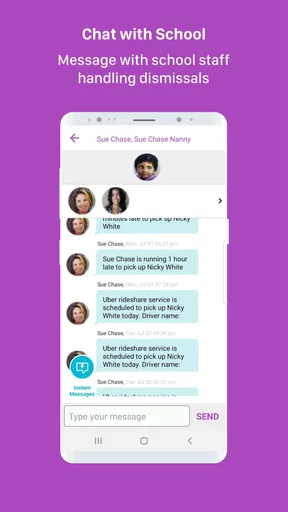
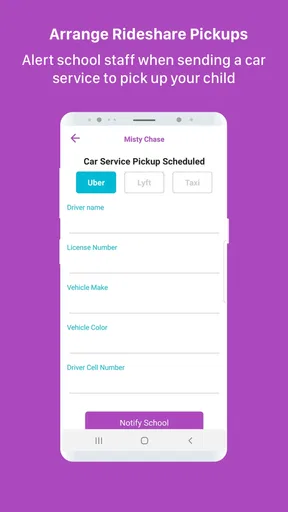
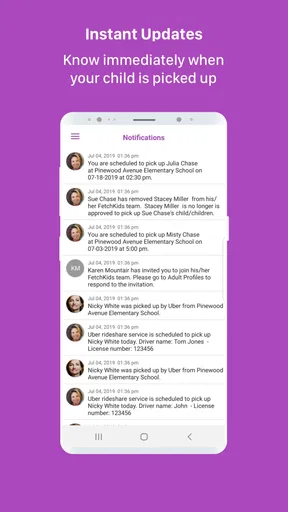
 Analysis by AppCompare
School pickup sounds simple until several adults, changing dismissal plans, and a busy front office all have to line up at the same time. FetchKids is a free parenting app from Expanded Apps, Inc. designed around that narrow but important problem: helping schools manage how students are dismissed. I approached it less like a general family organizer and more like a digital connection point between school staff and the people responsible for getting children home.
That distinction matters. This is not the kind of app I would open to plan meals, share a family calendar, or coordinate every part of a child’s routine. Its value is concentrated in the handoff at the end of the school day. When that handoff is orderly, the app can make a stressful process feel more controlled. When the phone connection is weak or the information is not current, the same dependence on mobile communication becomes the main source of friction.
The app sits in the parenting category, carries an Everyone age rating, and is available at no cost. It has reached over ten thousand installs, with an average rating of about 3.1 from roughly thirty ratings and eighteen reviews. Those figures suggest a modest user base rather than a universally established household tool, so I would judge it primarily by whether it fits a school’s dismissal workflow, not by popularity alone.
How FetchKids fits into the real pickup routine
I find it helpful to think of pickup as a chain of small decisions, not a single tap: the school needs an accurate plan, the collecting adult needs to follow the school’s process, and any change must reach the right people in time. This section looks at how FetchKids fits into that sequence and why preparing the handoff before arriving can matter more than checking the phone repeatedly.
A focused tool for the school gate
The most useful way to understand this app is to picture the final part of a school day. A parent arrives, a guardian may be collecting more than one child, and school staff need to know which students should be released and in what order. A conventional phone call or paper sign-out process can work, but it can also create queues, repeated explanations, and opportunities for information to be missed.
FetchKids is intended to give that process a more organized digital shape. The store summary describes it as school administration software for managing student dismissal, and that focus comes through clearly. It is not trying to replace the school’s broader communication system. Instead, it addresses the narrow moment when a student moves from school supervision to an approved pickup arrangement.
In my view, that narrow purpose is both its strength and its limitation. A specialized pickup tool can be easier for staff to understand than a large school platform filled with unrelated modules. On the other hand, families may still need another channel for announcements, attendance messages, homework, or emergency communication. I would not install it expecting one app to cover the entire relationship between home and school.
Worth Reading Before You Choose

EA SPORTS FC Mobile 26 Is a Bigger Football Game, but It Takes Time

Flipboard Shows What News Apps Must Do Beyond the Feed

Switching to Android Auto Means Rethinking Your Driving Routine

Google Calendar Makes a Crowded Week Easier to Manage

Ludo King Makes the Most of the Minutes Between Plans

Baby Panda World Brings Quick Play to Modern Phones, but Its Game Library Feels Busy
Why the phone context changes the experience
Pickup usually happens while I am walking across a parking area, sitting in a car, carrying bags, or watching another child. That is a very different setting from using a school portal at a desk. A useful dismissal app therefore needs to support quick attention: I should be able to check what matters without navigating through a complicated maze or composing a long message.
That mobile setting also creates practical trade-offs. A phone may be in a pocket, the screen may be difficult to read in bright light, and the driver should not be interacting with it while moving. My safest routine would be to prepare any necessary information before entering the pickup lane, then use the device only when fully stopped. The app can organize the process, but it cannot remove the need for sensible behavior around vehicles and children.
For a parent who regularly collects children from one participating school, the app’s focused design is more appealing than a general-purpose messaging service. For a relative who picks up a child only occasionally, the value depends on how easily that person can be included in the school’s established process. I would want every occasional caregiver to know the procedure before arriving, rather than trying to learn it while a line is waiting behind them.
Connectivity is part of the workflow
Because this experience involves school-side coordination and a mobile device, connectivity is not a minor technical detail. The important moment is often time-sensitive: staff need current pickup information, and the adult arriving at school needs confidence that the relevant status is current. A weak signal, a congested network, or an interrupted session can make a simple action feel uncertain.
I would treat the app as a connected service rather than assuming that every action will remain available without a network. That means checking the app before reaching the busiest part of the pickup area, keeping the phone charged, and avoiding last-second changes whenever possible. These are small habits, but they reduce the chance that the most important interaction happens while the device is struggling to communicate.
There is also a human side to connectivity. If a parent’s phone cannot connect, school staff may still need a way to verify the pickup through their normal procedures. The app should be viewed as part of a dismissal system, not as permission to ignore the school’s fallback instructions. I would ask the school directly what to do if the phone is lost, damaged, out of battery, or unable to reach the service.
A realistic afternoon with the app
Imagine that I am leaving work and heading to school for pickup. Before entering the queue, I check the phone and make sure the information connected with that day’s collection is correct. At the school, staff can work from the dismissal information available to them instead of relying entirely on shouted names or a paper note passed between adults. If everything is current, the app has done its job quietly: it has reduced uncertainty rather than demanded attention.
Now change the situation. A family member is collecting the child instead, the plan changes late, and the phone is operating on an unreliable connection. This is where I would be cautious. I would not assume that changing something at the last second automatically guarantees that every relevant person sees it immediately. I would follow the school’s required confirmation process and, if necessary, contact the office through its accepted channel.
That scenario highlights an important insight: the app’s success depends on the whole chain, not just the parent’s screen. The school must use the system consistently, the responsible adult must provide accurate information, and the network must carry the update at the right time. A polished interface cannot compensate for a school that keeps parallel paper and verbal methods without clearly defining which source takes priority.
Handling mistakes and interrupted communication
Dismissal information is sensitive because a small mistake can have an immediate effect. I would be especially careful with names, authorized adults, dates, and last-minute changes. Before confirming anything, I would pause and check the details rather than tapping through quickly while distracted. The best workflow is usually the one that prevents an error before it reaches the school staff.
If a connection drops during an important action, my advice is simple: do not assume success merely because the screen changed or the app stopped responding. Check for a clear confirmation when possible, then use the school’s backup method if the situation is urgent. Repeating an action blindly can create confusion if the first attempt actually went through, while doing nothing can leave staff with outdated information.
This is one area where a traditional phone call or direct conversation may still be better. A call gives immediate human feedback when a pickup plan has changed unexpectedly, particularly if the school has a clearly identified office number. FetchKids is more attractive for a routine, repeatable process than for emergencies that require explanation or negotiation.
I would also establish a personal recovery habit: keep the school’s normal contact instructions accessible, arrive with enough time to resolve a problem, and tell backup caregivers what they should do if the app is unavailable. That preparation is not a criticism of the app; it is a realistic response to any connected system used during a time-sensitive handoff.
Using mobile data thoughtfully
For most families, occasional dismissal updates are unlikely to be the same kind of data-heavy activity as video streaming. Even so, I would avoid unnecessary refreshing while waiting in a crowded pickup area. Repeatedly reopening a screen does not make information more current if the service or school workflow has not changed, and it can drain a phone that may be needed for a call later.
There is a useful balance between convenience and restraint. I would check the app when I have a clear reason, keep the device’s normal connection settings in place, and avoid assuming that a constantly open screen is safer than a deliberate check. If a family has a limited mobile plan or regularly visits schools with unreliable reception, it is worth learning the school’s preferred procedure rather than depending on repeated attempts to transmit an update.
Privacy also deserves attention in practical terms. A dismissal tool deals with children and authorized pickups, so I would use it only on a personal device I can control and avoid handing an unlocked phone to another person in a busy public area. I would also make sure occasional caregivers understand that pickup information is not something to share casually. The app’s usefulness comes from accurate, controlled communication, not from making every detail broadly visible.
Who will benefit most
I think FetchKids is most suitable for families whose school actively uses it as part of a defined dismissal procedure. In that situation, the app can reduce the need to repeat routine information and can give parents a clearer role in the pickup process. It may be particularly helpful for households with recurring changes in who collects a child, provided those changes are entered early enough and the school’s rules are followed.
It may also suit school administrators who want a focused alternative to informal lists, handwritten notes, or a general messaging app. A dedicated dismissal workflow can make responsibilities clearer: staff manage release, while families provide the relevant pickup information through the channel the school has chosen.
I would skip it, or at least avoid relying on it as the only method, if the school does not use it consistently. A parent cannot gain much from installing a school-specific tool when staff still require every change by phone or paper. I would also prefer a broader school platform if my main need is grades, attendance, messaging, calendars, and payments in one place. FetchKids is a specialist, not a complete school-family suite.
What the app’s age and device requirements mean
The Everyone rating makes the app broadly approachable from an age-classification perspective, although the actual user will usually be a parent, guardian, or school employee rather than a young child. That distinction is worth keeping in mind: an age rating describes suitability, not the responsibilities involved in handling pickup information.
The current version is 1.7.0.3 and it supports devices running Android 5.0 or later. That minimum makes it potentially usable on older Android phones, which is helpful for families who keep a previous device as a backup. Still, an older operating system may offer a less comfortable experience than a newer phone, especially in a crowded pickup environment where reliability and readability matter more than having the newest features.
Since the app is free, the financial barrier is low. The more important cost is practical: learning another school-specific workflow, keeping the phone ready, and remembering which changes must be made through the app versus another school channel. Free does not automatically mean effortless, and I would judge the installation worthwhile only after confirming that the child’s school actually expects families to use it.
How it compares with familiar alternatives
The usual alternatives are a paper sign-out sheet, a phone call, a text message, email, or a broad school communication platform. Paper can be dependable when the process is simple and the office is staffed well, but it is slower to update and easier to misread. A phone call is better for unusual situations because a person can clarify the details, yet calls create delays when many families contact the office at once.
Text and email are convenient for communication, but they are not automatically structured for dismissal. Important information can be buried in a conversation, sent to the wrong person, or interpreted differently by staff and caregivers. A larger school platform may offer more functions, but its extra sections can be unnecessary if the only pressing need is an organized pickup handoff.
FetchKids makes the most sense when the school has standardized its use and the family wants a focused digital route. It is less compelling when the school’s process is already fast, clear, and consistently handled through another channel. The deciding factor is not whether a dedicated app sounds modern; it is whether it removes a specific point of confusion in the school’s existing routine.
My connectivity verdict
After looking at the app through the reality of mobile pickup, I see FetchKids as a practical niche tool rather than an essential parenting app for everyone. Its free access, focused purpose, and compatibility with Android devices from version 5.0 onward make it easy to consider. The modest adoption and average rating of about 3.1 also tell me to approach it with realistic expectations rather than assuming a universally polished experience.
My recommendation is conditional: use it when your school has made it part of the official dismissal workflow, but keep a clear backup for connection problems and urgent changes. That approach respects what the app is designed to do without asking it to replace every other form of school communication.
For a routine pickup where the school, caregiver, and phone are all connected, FetchKids can bring useful structure to a moment that often becomes chaotic. For a last-minute emergency, an unreliable network, or a school that barely uses the service, a direct call or established office procedure may be the better choice. I would install it for a participating school, prepare the routine before pickup, and judge its success by one simple result: fewer misunderstandings when children are being released.
Pros
- Clear pickup schedules help families stay organized.
- Useful reminders can reduce missed pickups and last-minute confusion.
- Designed to simplify coordination between parents and caregivers.
- A focused interface keeps essential pickup details easy to find.
- Can improve communication around children’s daily transportation.
Cons
- Requires all relevant caregivers to use the app consistently.
- Setup may take time when adding children
- contacts
- and schedules.
- Limited usefulness if schools or services do not support the platform.
- Users may need notifications enabled for timely pickup updates.
- Sharing child-related information raises privacy concerns for some families.
FAQs for FetchKids - Organized Pickups
What is FetchKids - Organized Pickups used for?
FetchKids - Organized Pickups is designed to help families coordinate children’s transportation and scheduled pickups in a more organized way. Parents or guardians can use it to manage pickup details, share relevant instructions, and keep track of arrangements involving approved caregivers or drivers. It can be especially useful for school runs, activities, appointments, and other recurring transportation needs.
How does FetchKids help organize a child’s pickup?
The app brings pickup-related information into one place, helping families avoid relying entirely on scattered text messages or verbal reminders. Depending on the setup, users may be able to add children, specify pickup times and locations, communicate instructions, and coordinate with authorized people. Before using it for an important trip, review every detail carefully and make sure all participating adults understand the arrangement.
Is FetchKids - Organized Pickups safe for children and family information?
Because the app may handle sensitive details such as children’s names, schedules, locations, and caregiver information, users should review its privacy policy and permissions before creating an account. Only invite people you trust, use a strong password, and avoid sharing login details. Families should also confirm the identity and authorization of every person involved in a pickup outside the app.
Does FetchKids require an account or internet connection?
Most organized pickup platforms require users to create an account so schedules, participants, and notifications can be connected to the correct family or group. An internet connection may also be necessary to send updates, receive changes, or synchronize pickup information. Availability of specific features can depend on the app version, device, and service configuration, so check the current store listing before downloading.
Is FetchKids free to download and suitable for every family?
The download price and available features may vary between Android and iOS, and some services may include optional paid plans, organization-based access, or in-app purchases. FetchKids is most useful for families, schools, childcare groups, or communities that regularly coordinate pickups. Before committing, check pricing, supported devices, age requirements, and whether your school or transportation group already uses the platform.


